



Sunroof
If the vehicle has a power sunroof it will only operate when the ignition is in ON/RUN or ACC/ACCESSORY, or when Retained Accessory Power (RAP) is active. See Ignition Positions (Key Access) or Ignition Positions (Keyless Access) and Retained Accessory Power (RAP).
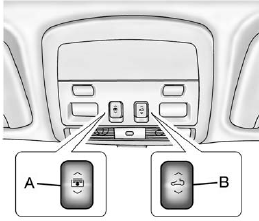
The driver side switch (A) operates the sunshade.
Open/Close: Press and hold the front or rear of the switch (A) to open or close the sunshade.
Express Open/Express Close:
Press and release the rear or front of the switch (A) to express open or express close the sunshade. To stop the sunshade partway, press the switch (A) a second time.
The passenger side switch (B) operates the sunroof.
Vent: Coupe only, press and hold the front of the switch (B) to vent the sunroof. The sunshade will automatically open approximately fifteen inches. Press and hold the rear of the switch (B) to close the sunroof vent.
Express Open/Express Close:
Press and release the rear or front of the switch (B) to express open or express close the sunroof. To stop the sunroof partway, press the switch (B) a second time.
Comfort Stop: The sunroof has a comfort stop feature that stops the sunroof from opening to the full-open position. Press the rear of the sunroof switch (B) to the first detent to open the sunroof to the comfort open position. Press the rear of the switch (B) again to fully open the sunroof.
For more information see Sunroof.
See also:
Interior
Five occupants get to enjoy soft all-leather seats. Offerings include heated
and ventilated seating and a heated steering wheel. The STS features genuine
eucalyptus wood and aluminum trim.
Eight ...
Safety
Standard features include antilock brakes, side-impact airbags for the front
seats, side curtain airbags, an electronic stability system, and a tire pressure
monitoring system. For a full list of ...
Returning the Seat to the Sitting Position
To return the seat to the sitting position from the tumbled position:
1. Pull the seat down until it latches to the floor. The seatback cannot be raised
if the seat is not latched to the floor.
...