



Lower Anchor and Top Tether Anchor Locations
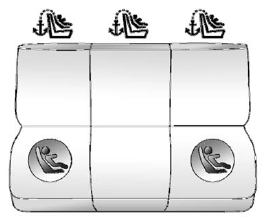
Rear Seat – Sedan or Wagon
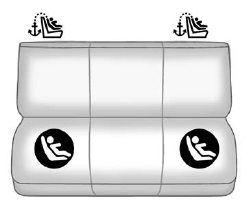
Rear Seat – Coupe
 (Top Tether Anchor): Seating
positions with top tether anchors.
(Top Tether Anchor): Seating
positions with top tether anchors.
 (Lower Anchor): Seating
positions with two lower anchors.
(Lower Anchor): Seating
positions with two lower anchors.
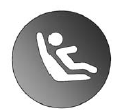
To assist in locating the lower anchors, each seating position with lower anchors has two labels, near the crease between the seatback and the seat cushion.
For a wagon the lower anchors are beneath zippers, near the labels.
Open the zippers to access the lower anchors.
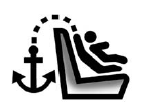
To assist in locating the top tether anchors, the top tether anchor symbol is on the cover.
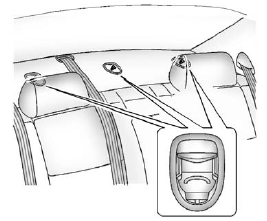
Sedan
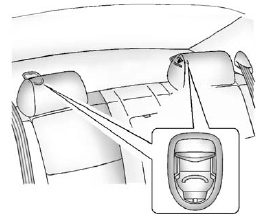
Coupe
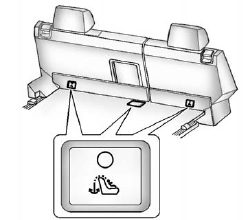
Wagon
The top tether anchors for a sedan or a coupe are under the tether covers, on the rear seatback filler panel. For the wagon, the outboard top tether anchors are under the tether covers behind the rear seatback. The wagon's center top tether anchor is under the tether cover, on the vehicle floor, behind the rear seatback.
Be sure to use an anchor on the same side of the vehicle as the seating position where the child restraint will be placed.
Do not secure a child restraint in a position without a top tether anchor if a national or local law requires that the top tether be attached, or if the instructions that come with the child restraint say that the top tether must be attached.
According to accident statistics, children and infants are safer when properly restrained in a child restraint system or infant restraint system secured in a rear seating position. See Where to Put the Restraint for additional information.
See also:
Highway Hypnosis
Always be alert and pay attention to your surroundings while driving. If you
become tired or sleepy, find a safe place to park the vehicle and rest.
Other driving tips include:
Keep the vehicle ...
How the System Works
The SBZA symbol lights up in the side mirrors when the system detects a vehicle
in the side blind zone, indicating it may be unsafe to change lanes. Before making
a lane change, check the SBZA dis ...
Remote Door Lock Feedback
This feature allows you to select the
type of feedback you will receive
when locking the vehicle with the
Remote Keyless Entry (RKE) or
keyless access transmitter, or when
the vehicle is aut ...