



Cargo Cover (Wagon)
The cargo cover can be used to cover items in the cargo area.
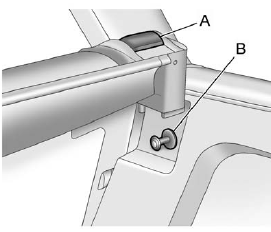
To install the cargo cover:
1. Hold the cartridge with the pull-out shade toward the rear of the vehicle.
2. Align the cartridge over the pin (B) on both sides. Press the cartridge down and turn it slightly forward until it clicks.
3. The cartridge is properly installed if it fits firmly when pulled and pushed.
4. Grasp the handle and unroll the cover. Latch the posts into the sockets.
To remove the cargo cover:
1. Release the cover from the latch posts and carefully roll it back up.
2. Pull the handle (A) back and remove it from the pin (B) on the trim panel. Repeat this on the other side.
WARNING!
An unsecured cargo cover could
strike people in a sudden stop or
turn, or in a crash. Store the
cargo cover securely or remove it
from the vehicle.
See also:
Battery
Refer to the replacement number shown on the original battery label when a
new battery is needed.
See Engine Compartment Overview for battery location.
WARNING
Battery posts, terminals, and r ...
Steering Wheel Controls
Some audio steering wheel
controls could differ depending
on the vehicle's options.
Controls that can be adjusted at the
steering wheel may include:
SRCE: Press to switch between
AM, FM, o ...
Convenience Net (Sedan and Coupe)
The vehicle may have a
convenience net in the rear.
Put small loads behind the net.
It can also be positioned into an
envelope style to hold smaller items.
The net is not for heavier loads.
St ...