



Universal Remote System Operation
Using Universal Remote
Press and hold the appropriate Universal Remote button for at least half of a second. The indicator light will come on while the signal is being transmitted.
Erasing Universal Remote Buttons
All programmed buttons should be erased when the vehicle is sold or the lease ends.
To erase all programmed buttons on the Universal Remote device:
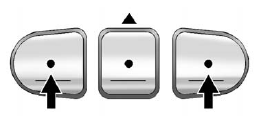
1. Press and hold down the two outside buttons until the indicator light begins to flash, after 20 seconds.
2. Release both buttons.
Reprogramming a Single Universal Remote Button
To reprogram any of the three Universal Remote buttons, repeat the programming instructions earlier in this section, beginning with Step 2.
For help or information on the Universal Home Remote System, call the customer assistance phone number under Customer Assistance Offices (U.S. and Canada) or Customer Assistance Offices (Mexico).
See also:
Passenger Sensing System
United States
Canada and Mexico
The passenger sensing system will turn off the front outboard passenger
frontal airbag and seat-mounted side impact airbag under certain conditions.
N ...
Tires
Use a stiff brush with tire cleaner to
clean the tires.
Notice: Using petroleum-based
tire dressing products on the
vehicle may damage the paint
finish and/or tires. When applying
a tire dr ...
Leaving the Vehicle with the Engine Running
WARNING
It can be dangerous to leave the vehicle with the engine running. The vehicle
could move suddenly if the shift lever is not fully in P (Park) with the parking
brake firmly set. And, ...