



Hazard Warning Flashers
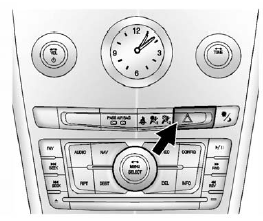
 (Hazard Warning Flasher):
Press this button located on the instrument panel near the audio system, to make the front and rear turn signal lamps flash on and off.
This warns others that you are having trouble. Press again to turn the flashers off.
See also:
Vehicle Symbol Chart
Here are some additional symbols that may be found on the vehicle and what they
mean. For more information on the symbol, refer to the Index.
: Adjustable Pedals
: Airbag Readiness Light
: Air ...
Vehicle Personalization
Your vehicle may have customization capabilities that allow you to program certain
features to one preferred setting. Customization features can only be programmed
to one setting on the vehicle an ...
Battery Replacement
Replace the battery if the REPLACE BATTERY IN REMOTE KEY message displays in
the DIC. See “REPLACE BATTERY IN REMOTE KEY” under Key and Lock Messages for additional information.
Notice: ...