



Climate Controls
The heating, cooling, and ventilation for the vehicle can be controlled with this system.
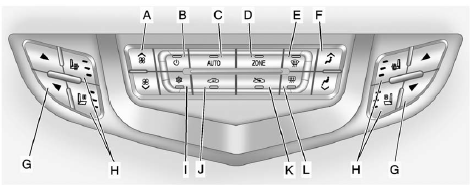
A. Fan Control
B. Power
C. AUTO (Automatic Operation)
D. ZONE
E. Defrost
F. Air Delivery Mode Control
G. Driver and Passenger
Temperature Control H. Driver and Passenger Heated and Ventilated Seats
I. Air Conditioning
J. Recirculation
K. Outside Air
L. Rear Window Defogger
See also:
Turn and Lane-Change Signals
An arrow on the instrument panel cluster will flash in the direction of the
turn or lane change.
Move the lever all the way up or down to signal a turn.
Raise or lower the lever until the a ...
Finish Care
Application of aftermarket clearcoat sealant/wax materials is not recommended.
If painted surfaces are damaged, see your dealer to have the damage assessed and
repaired. Foreign materials such as ...
Cigarette Lighter
There may be a cigarette lighter located under the climate control system,
inside the front storage bin.
To activate the cigarette lighter, push it into the heating element and let
go. The lighte ...