



Driver Information Center (DIC)
The DIC display is located at the bottom of the instrument panel cluster. It shows the status of many vehicle systems and enables access to the personalization menu.
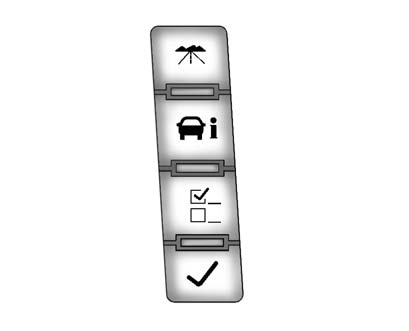
The DIC buttons are located on the instrument panel, next to the steering wheel.
 : Press to display the odometer,
trip odometer, fuel range, average economy, fuel used, timer, transmission temperature,
instantaneous economy, and average vehicle speed. The compass and outside air temperature
will also be shown in the display. The temperature will be shown in °C or °F depending
on the units selected.
: Press to display the odometer,
trip odometer, fuel range, average economy, fuel used, timer, transmission temperature,
instantaneous economy, and average vehicle speed. The compass and outside air temperature
will also be shown in the display. The temperature will be shown in °C or °F depending
on the units selected.
 : Press to display the oil life,
units, side blind zone system on/off, tire pressure readings for vehicles with the
Tire Pressure Monitor System (TPMS), compass zone setting, and compass recalibration.
: Press to display the oil life,
units, side blind zone system on/off, tire pressure readings for vehicles with the
Tire Pressure Monitor System (TPMS), compass zone setting, and compass recalibration.
 : Press to customize the feature
settings on your vehicle. See Vehicle Personalization for more information.
: Press to customize the feature
settings on your vehicle. See Vehicle Personalization for more information.
 : Press to set or reset certain
functions and to turn off or acknowledge messages on the DIC.
: Press to set or reset certain
functions and to turn off or acknowledge messages on the DIC.
For more information, see Driver Information Center (DIC) .
See also:
License Plate Lamp
To replace one of these bulbs:
1. Open the liftgate. See Liftgate for more information.
Passenger Side Shown, Driver Side
Similar
2. Push the left end of the lamp assembly towards the ri ...
Fog Lamps
To replace a front fog lamp bulb:
1. Pull out the push-pins located on
the underside of the protection
shield to remove the shield.
2. Reach up behind the front
bumper area from under the
...
Safety
The National Highway Traffic Safety Administration gave the 2007 Escalade a
five-star frontal crash-test rating; it hadn't done a side-impact test as of
this writing. Rollover ratings were listed ...