



Battery Replacement
Replace the battery if the REPLACE BATTERY IN REMOTE KEY message displays in the DIC. See “REPLACE BATTERY IN REMOTE KEY” under Key and Lock Messages for additional information.
Notice: When replacing the battery, do not touch any of the circuitry on the transmitter. Static from your body could damage the transmitter.
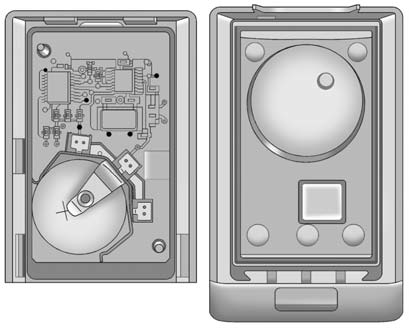
To replace the battery:
1. Separate the transmitter with a flat, thin object inserted into the notch,
located above the metal base.
2. Remove the old battery. Do not use a metal object.
3. Insert the new battery, positive side facing up. Replace with a CR2032 or equivalent
battery.
4. Snap the transmitter back together.
See also:
Flash-to-Pass
The flash—to—pass feature works with the low beams or Daytime Running Lamps
(DRL) on or off.
To flash the high beams, pull the turn signal/lane change lever all the way
toward you, then release i ...
Voice Pass-Thru
Voice pass—thru allows access to the voice recognition commands on the cell
phone. See your cell phone manufacturer's user guide to see if the cell phone
supports this feature.
To access contacts ...
Cruise Control
CTS Shown, CTS–V Similar
The cruise control buttons are
located on the left side of the
steering wheel.
: Press to turn the system on or
off. The indicator light on the button
turns on wh ...