



Driver Information Center (DIC)
The DIC display is located at the bottom of the instrument panel cluster. It shows the status of many vehicle systems and enables access to the personalization menu.
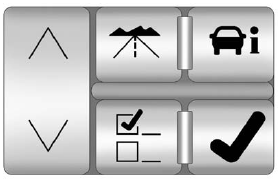
The DIC buttons are located on the instrument panel to the left of the steering wheel.
 : Press to scroll through the
trip and fuel displays.
: Press to scroll through the
trip and fuel displays.
 : Press to scroll through the
vehicle information displays.
: Press to scroll through the
vehicle information displays.
 : Press to customize the
feature settings on your vehicle.
: Press to customize the
feature settings on your vehicle.
See Vehicle Personalization for more information.
 : Press to reset certain DIC
features and to acknowledge DIC
warning messages and clear them
from the DIC display.
: Press to reset certain DIC
features and to acknowledge DIC
warning messages and clear them
from the DIC display.
 or
or
 : Press to scroll up and
down the menu items.
: Press to scroll up and
down the menu items.
For more information, see Driver Information Center (DIC).
Vehicle Customization
Some vehicle features can be programmed by using the DIC buttons on the instrument panel to the left of the steering wheel.
These features include:
- Language
- Door Lock and Unlock Settings
- Lighting
- Chime Volume
- Memory Settings
See Vehicle Personalization.
See also:
Radio Message
Locked: Displays when the
TheftLock® system has locked up
the infotainment system. Take the
vehicle to your dealer for service.
If any error occurs repeatedly or if
an error cannot be correct ...
Roof
Sunroof
If the vehicle has a power
sunroof it will only operate when
the ignition is in ON/RUN or
ACC/ACCESSORY, or when
Retained Accessory Power (RAP)
is active. See Ignition Positions
( ...
Engine Drive Belt Routing
If the vehicle is a hybrid, see the hybrid supplement for more information. ...