



Storing the Fe
1. Lift the cargo management system cover.
2. Release the cover from the prop rod as described in the previous steps.
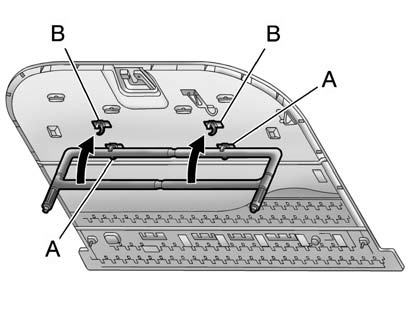
3. Insert the top of the fence into the lower two clips (A).
4. Turn the bottom of the fence up and insert it into the upper two clips (B).
See also:
Dual Automatic Climate Control System
Dual Automatic Climate Control System
The heating, cooling, and ventilation for the vehicle can be controlled with
this system.
A. Display
B. Fan
C. Power
D. AUTO (Automatic Operation)
E. PA ...
Securing an Add-On Child Restraint in the Vehicle
WARNING
A child can be seriously injured or killed in a crash if the child restraint is
not properly secured in the vehicle. Secure the child restraint properly in the
vehicle using the vehicle sa ...
Removing the Spare Tire and Tools
The equipment needed to change a flat tire is stored under the storage tray,
located on the driver side trim panel, over the rear wheelhouse.
Regular Wheelbase Shown, Extended Wheelbase Similar.
...