



Battery Replacement
Replace the battery if the REPLACE BATTERY IN REMOTE KEY message displays in the DIC. See “REPLACE BATTERY IN REMOTE KEY” under Key and Lock Messages for additional information.
Notice: When replacing the battery, do not touch any of the circuitry on the transmitter. Static from your body could damage the transmitter.
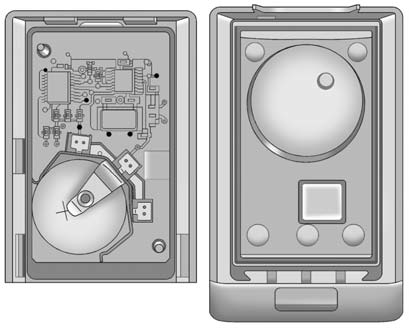
To replace the battery:
1. Separate the transmitter with a flat, thin object inserted into the notch,
located above the metal base.
2. Remove the old battery. Do not use a metal object.
3. Insert the new battery, positive side facing up. Replace with a CR2032 or equivalent
battery.
4. Snap the transmitter back together.
See also:
Steering Wheel Adjustment
To adjust the steering wheel:
1. Pull the lever down.
2. Move the steering wheel up or down.
3. Pull or push the steering wheel closer or away from you.
4. Pull the lever up to lock the stee ...
Cruise Control
WARNING
Cruise control can be dangerous where you cannot drive safely at a steady speed.
So, do not use the cruise control on winding roads or in heavy traffic.
Cruise control can be dangerou ...
Selecting the Right Engine Oil
Selecting the right engine oil depends on both the proper oil specification and
viscosity grade. See Recommended Fluids and Lubricants .
Specification
Use and ask for licensed engine oils wi ...