



Roof
Sunroof
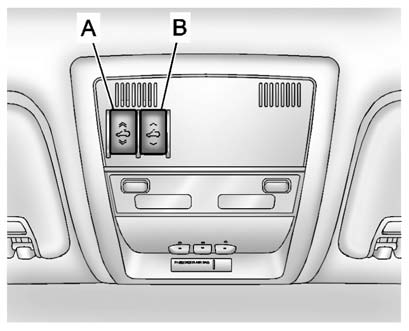
A. Open or Close
B. Vent
On vehicles with a sunroof, the sunroof only operates when the ignition is in the ACC/ACCESSORY or ON/RUN, or when Retained Accessory Power (RAP) is active. See Retained Accessory Power (RAP)
Vent: From the closed position, press the rear of switch (B) to vent the sunroof.
Open/Close: To open the sunroof, press and hold switch (A) until the sunroof reaches the desired position. Press and hold the front of switch (A) to close it.
Express-Open/Express-Close: To express-open the sunroof, fully press and release the rear of switch (A) until the sunroof reaches the desired position. To express-close the sunroof, fully press and release the front of switch (A). Press the switch again to stop it.
When the sunroof is opened, an air deflector will automatically raise. The air deflector will retract when the sunroof is closed.
The sunroof also has a sunshade which can be pulled forward to block sun rays. The sunshade must be opened and closed manually.
If an object is in the path of the sunroof while it is closing, the anti-pinch feature will detect the object and stop the sunroof.

Dirt and debris may collect on the sunroof seal or in the track. This could cause an issue with sunroof operation or noise. It could also plug the water drainage system. Periodically open the sunroof and remove any obstacles or loose debris. Wipe the sunroof seal and roof sealing area using a clean cloth, mild soap, and water. Do not remove grease from the sunroof.
See also:
Conference Calling
Conference calling and three—way calling must be supported on the Bluetooth
phone and enabled by the wireless service carrier to work.
To start a conference while in a current call:
1. Turn or ...
Auto Fan Speed
This will allow you to select the automatic fan speed. This feature sets the
climate control fan speed to maintain the interior temperature.
Press the MENU/SELECT knob when Auto Fan Speed is highl ...
Vehicle Positioning
At times, the position of the vehicle on the map may be inaccurate due to one
or more of the following reasons:
Road system has changed.
Vehicle is driving on slippery road surfaces such as in ...