



Heated and Cooled Cupholders
For vehicles with heated and cooled cupholders, these are located in the front center console.
Press down on the access door release button to open the cupholder door.
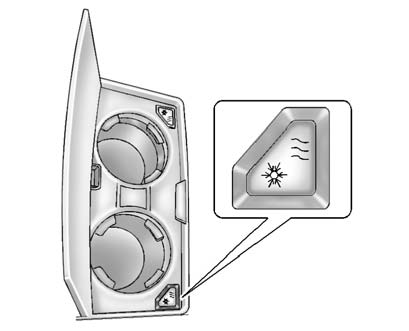
To set to cool mode, press and release the button; the i shows blue. Press and release again to turn it off.
To set to heat mode, press and release the button; the h shows red. Press and release again to turn it off.
Insulated containers will not work properly. Use only non-insulated containers.
Notice: When the cuphholder is turned on, the inside receptacles are hot or cold. Temperature variations in the cupholders may cause condensation. To avoid damage, do not store electronic devices or other items here.
See also:
Tire Sealant
Read and follow the safe handling
instructions on the label adhered to
the sealant canister.
Check the tire sealant expiration
date on the sealant canister.
The sealant canister should be
re ...
Universal Remote System Programming
If the vehicle has this feature, you will see these buttons with one
indicator light next to them in the overhead console.
This system provides a way to replace up to three remote control tran ...
Navigation System
If the vehicle has a navigation
system, there is a separate
navigation system manual that
includes information on the radio,
audio players, and navigation
system.
The navigation system prov ...