



Memory Features
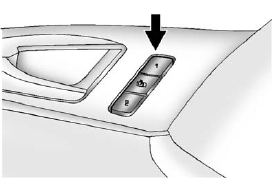
On vehicles with the memory package, memory buttons 1 and 2 on the driver door are used to save and recall memory settings for the driver seat cushion and seatback, outside mirrors, and the steering column position, if the vehicle is equipped with the power tilt and telescopic steering column.
1: Saves and recalls for driver 1.
2: Saves and recalls for driver 2.
 : Moves the driver seat and/or
power steering column to the exit
position. See “Exit Recall” later in
this section.
: Moves the driver seat and/or
power steering column to the exit
position. See “Exit Recall” later in
this section.
See also:
Weight of the Trailer
How heavy can a trailer safely be?
It depends on how the rig is used. Speed, altitude, road grades, outside temperature
and how much the vehicle is used to pull a trailer are all important. It can ...
Windshield Washer
WARNING!
In freezing weather, do not use
the washer until the windshield
is warmed. Otherwise the
washer fluid can form ice on the
windshield, blocking your vision. ...
Oil Life Remaining
If the vehicle has this display,
it shows the estimated oil life
remaining. If you see 99% Oil Life
Remaining on the display, that
means that 99% of the current oil
life remains.
When the o ...