



Keyless Trunk/Liftgate Opening
Press the trunk/liftgate release button located above the license plate to open the trunk/liftgate if the keyless access transmitter is within range. See Trunk (Sedan, Coupe) for additional information.
There are other conditions that affect the performance of the transmitter. See Remote Keyless Entry (RKE) System.
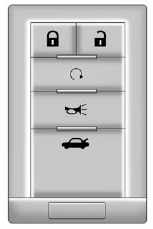
With Remote Start Shown,
without and Wagon Similar
 (Lock): Press once to lock the
doors. The turn signal indicators
flash. When is pressed twice,
the turn signal indicators flash twice,
and the horn sounds once to
confirm locking.
(Lock): Press once to lock the
doors. The turn signal indicators
flash. When is pressed twice,
the turn signal indicators flash twice,
and the horn sounds once to
confirm locking.
To program the vehicle so the turn
signal indicators do not flash and
the horn does not sound when
pressing on the keyless access
transmitter, see “Remote Door
Lock Feedback” under Vehicle
Personalization.
 (Unlock): Press once to unlock
only the driver door. The turn signal
indicators flash twice.
(Unlock): Press once to unlock
only the driver door. The turn signal
indicators flash twice.
Press twice within five seconds
to unlock all the doors. The interior
lamps may come on.
To program the vehicle so the turn signal indicators do not flash and the fog lamps and back-up lamps remain on steady for about 20 seconds when the keyless access transmitter is used to unlock the vehicle, see “Remote Door Unlock Feedback” under Vehicle Personalization.
For vehicles with the memory
feature, press on the keyless
access transmitter to program
and recall the memory settings.
See Memory Seats for more information.
 (Remote Start): Press to
operate the remote start feature.
(Remote Start): Press to
operate the remote start feature.
See Remote Vehicle Start for additional information.
 (Remote Trunk/Liftgate
Release): Press and hold for about
one second to unlock the trunk/
liftgate. The automatic transmission
must be in P (Park) or the manual
transmission must be in Neutral with
the parking brake set.
(Remote Trunk/Liftgate
Release): Press and hold for about
one second to unlock the trunk/
liftgate. The automatic transmission
must be in P (Park) or the manual
transmission must be in Neutral with
the parking brake set.
 (Vehicle Locator/Panic
Alarm): Press and release to
locate the vehicle. The horn sounds
three times and the turn signal
lamps flash three times.
(Vehicle Locator/Panic
Alarm): Press and release to
locate the vehicle. The horn sounds
three times and the turn signal
lamps flash three times.
Press and hold for
three seconds to sound the panic
alarm. The horn sounds and the
turn signal lamps flash for
30 seconds. Press and release
again to stop the alarm.
The vehicle comes with two transmitters. Each transmitter will have a number on top of it, “1” or “2.” These numbers correspond to the driver of the vehicle. For example, the memory seat position for driver 1 will be recalled when using the transmitter labeled “1,” if enabled through the DIC. See Memory Seats and Vehicle Personalization for more information.
See also:
Manual Operation
(Power): Press to turn the
climate control system on or off.
When the climate control system is
turned off the air inlet defaults to
outside air.
(Fan Control): Press the
buttons to increa ...
Engine Oil Pressure Light
Notice: Lack of proper engine oil maintenance can damage the engine.
Driving with the engine oil low can also damage the engine. The repairs would
not be covered by the vehicle warranty. Check the o ...
When the System Does Not Seem To Work Properly
The RVC system might not work properly or display a clear image if:
The RVC is turned off. See “Turning the RVC System On or Off” earlier
in this section.
It is dark.
The sun or the beam of ...