



Window Lockout
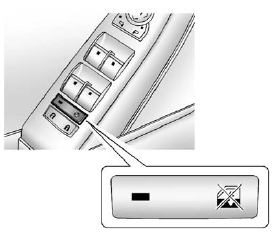
 (Window Lockout): This feature
prevents the rear passenger
windows from operating, except
from the driver position.
(Window Lockout): This feature
prevents the rear passenger
windows from operating, except
from the driver position.
Press to activate the rear window
lockout switch. The LED light comes
on when activated.
Press gain to deactivate the
lockout switch.
See also:
Odometer
The odometer shows how far the vehicle has been driven, in either kilometers
or miles.
This vehicle has a tamper-resistant odometer. If the vehicle needs a new
odometer installed, the new one is ...
Driving on a Route
When driving on a routed destination, the map screen automatically displays the
next maneuver.
The pop-up displays the next maneuver direction and the distance from it.
When approximately 400 ...
California Proposition 65 Warning
Most motor vehicles, including this one, contain and/or emit chemicals known
to the State of California to cause cancer and birth defects or other reproductive
harm. Engine exhaust, many parts and ...