



Memory Seats
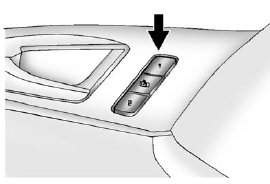
On vehicles with the memory feature, memory buttons 1 and 2 on the driver door are used to save and recall memory settings for the driver seat cushion and seatback, outside mirrors, and the steering column position, if the vehicle is equipped with the power tilt and telescopic steering column.
1: Saves and recalls for driver 1.
2: Saves and recalls for driver 2.
 (Exit Button): Moves the driver
seat and/or power steering column
to the exit position. See “Exit Recall”
later in this section.
(Exit Button): Moves the driver
seat and/or power steering column
to the exit position. See “Exit Recall”
later in this section.
See also:
Secondary Latch System
This vehicle has an underbody-mounted tire hoist assembly equipped with a secondary
latch system. It is designed to stop the spare tire from suddenly falling off your
vehicle. For the secondary la ...
Off-Road Recovery
The vehicle's right wheels can drop off the edge of a road onto the shoulder
while driving. Follow these tips:
1. Ease off the accelerator and then, if there is nothing in the way, steer the ...
Exit Lighting
The headlamps, taillamps, parking lamps, back—up lamps, and license plate
lamps come on at night, or in areas with limited lighting, when a door is
opened after the ignition is turned off. The dome ...