



Installing the Crossrails
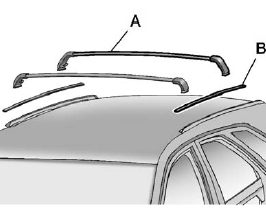
A. Crossrails
B. Siderail Cover
Before installing the crossrails (A), remove the siderail covers (B). Pull straight up on the rear of the siderail cover. Store covers flat, do not stack items on them.
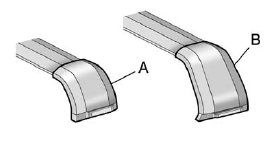
1. Identify the front and rear crossrail.
2. The front crossrail (A) is smaller than the rear crossrail (B).
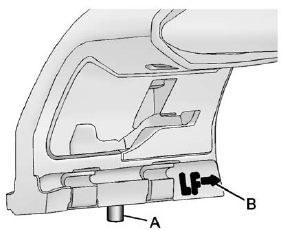
3. The crossrail supports are labeled with an arrow (B) that needs to point toward the front of the vehicle. A pin (A) will be visible on the bottom when the crossrail support lever is down.
To install the crossrail support, move the lever into the forward upper position; the pin (A) will not be visible.
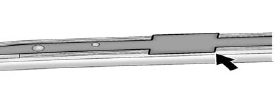
4. Locate the forward or rearward cut-out in the siderail channel.
5. Insert both crossrail ends into the cut-outs, making sure the arrows are pointed toward the front of the vehicle.
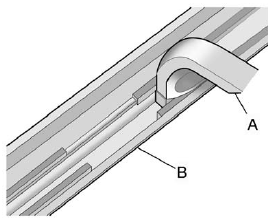
6. Levers must still be in the forward up position. Move the front crossrail forward beyond the cut-out area (B). For the rear crossrail, slide the crossrail assembly (A) rearward until the entire crossrail support is in first position beyond the channel cut-out area (B).
7. Move the levers on both crossrails to the down position.
Slide the crossrail until the crossrail pin engages.
8. The crossrails should lock in the same hole position on each side.
See also:
How to Wear Safety Belts Properly
This section is only for people of adult size.
There are special things to know about safety belts and children.
And there are different rules for smaller children and infants. If a child
will ...
Parking over Things That Burn
WARNING
Things that can burn could touch hot exhaust parts under the vehicle and ignite.
Do not park over papers, leaves, dry grass, or other things that can burn. ...
Engine Oil
To ensure proper engine performance and long life, careful attention must be
paid to engine oil. Following these simple, but important steps will help protect
your investment:
Always use engin ...