



Tire and Loading Information Label
 " width=409 height=331
id="_x0000_i1624" src="images/books/1183/6/index.39.gif" border=0>
" width=409 height=331
id="_x0000_i1624" src="images/books/1183/6/index.39.gif" border=0>
Label Examp
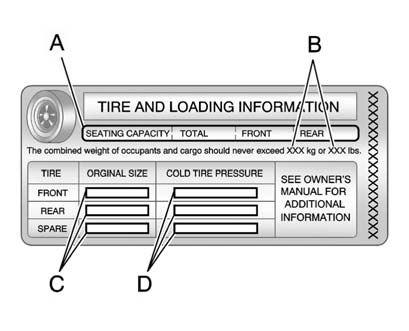
A vehicle-specific Tire and Loading Information label is attached to the vehicle's center pillar (B-pillar). With the driver door open, the label is attached near the door lock post. The Tire and Loading Information label shows the number of occupant seating positions (A), and the maximum vehicle capacity weight (B) in kilograms and pounds.
The Tire and Loading Information label also shows the tire size of the original equipment tires (C) and the recommended cold tire inflation pressures (D). For more information on tires and inflation see Tires and Tire Pressure.
There is also important loading information on the Certification label. It tells you the Gross Vehicle Weight Rating (GVWR) and the Gross Axle Weight Rating (GAWR) for the front and rear axle. See “Certification Label” later in this section.
See also:
Control Buttons
The buttons used to control the MEM player are:
MEM/CD/AUX: Press to select the MEM player.
SEEK/ SEEK: Press to select tracks or to fast
forward or rewind within a track.
INFO: Press to dis ...
Courtesy Transportation Program (U.S. and Canada)
To enhance your ownership experience, we and our participating dealers are proud
to offer Courtesy Transportation, a customer support program for vehicles with the
Bumper-to-Bumper (Base Warranty ...
Collision Parts
Genuine GM Collision parts are new parts made with the same materials and construction
methods as the parts with which the vehicle was originally built. Genuine GM Collision
parts are the best cho ...