



Lap-Shoulder Belt
All seating positions in the vehicle have a lap-shoulder belt.
The following instructions explain how to wear a lap-shoulder belt properly.
1. Adjust the seat, if the seat is adjustable, so you can sit up straight. To see how, see “Seats” in the Index.
2. Pick up the latch plate and pull the belt across you. Do not let it get twisted.
The lap-shoulder belt may lock if you pull the belt across you very quickly. If this happens, let the belt go back slightly to unlock it.
Then pull the belt across you more slowly.
If the shoulder portion of a passenger belt is pulled out all the way, the child restraint locking feature may be engaged.
If this happens, let the belt go back all the way and start again.
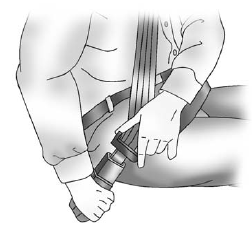
3. Push the latch plate into the buckle until it clicks.
Pull up on the latch plate to make sure it is secure. If the belt is not long enough, see Safety Belt Extender.
Position the release button on the buckle so that the safety belt could be quickly unbuckled if necessary.
4. If equipped with a shoulder belt height adjuster, move it to the height that is right for you.
See “Shoulder Belt Height Adjuster” later in this section for use and important safety information.
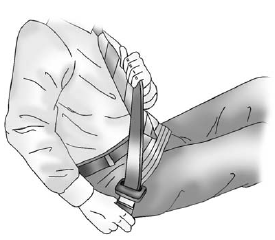
5. To make the lap part tight, pull up on the shoulder belt.
It may be necessary to pull stitching on the safety belt through the latch plate to fully tighten the lap belt on smaller occupants.
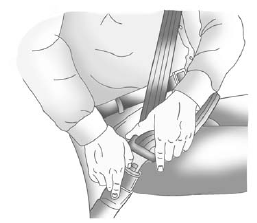
To unlatch the belt, push the button on the buckle. The belt should return to its stowed position.
Before a door is closed, be sure the safety belt is out of the way. If a door is slammed against a safety belt, damage can occur to both the safety belt and the vehicle.
See also:
Magnetic Ride Control
With this feature on the CTS-V,
the Magnetic Ride Control system
adjusts the ride of the vehicle to
Tour or Sport modes. Magnetic Ride
Control monitors the suspension
system to determine the ...
Center Console Storage
The center console has an armrest, upper storage tray, and a lower storage
area.
The armrest can be adjusted to a rearward, middle, and forward position.
Slide the top of the armrest to adjust to ...
Setting the Clock
The navigation system time and the analog clock operate independently. Changing
the time through the navigation system does not change the time on the analog clock.
See Clock to change ...